Connecting OpenCode to a Restricted Set of Amazon Bedrock Models
This guide walks you through securely connecting OpenCode to a restricted set of Amazon Bedrock models by creating dedicated application inference profiles. You'll learn how to set up proper IAM permissions, configure your OpenCode environment, and work with a restricted set of models while keeping your data within a single geographic area for data residency and latency benefits.
What you'll learn:
- How to create application inference profiles for a restricted set of Amazon Bedrock models
- How to generate a long-term Bedrock API key and scope it with an IAM policy
- How to configure OpenCode to use your custom inference profiles
- How to monitor usage and temporarily deactivate your API key
Why limit model access to a restricted set of models?
As a member of the AWS Community Builders program, I receive $500 in AWS credits. This motivated me to set up OpenCode and utilize part of these credits with models hosted by Amazon Bedrock. Since the credits only apply to models trained by AWS, I wanted to ensure my setup limited model access exclusively to those covered by the credits. You can apply this method to restrict access to any desired models, including those from third-party labs.
Create the Inference Profiles
Application inference profiles are the key primitive here: each one is a virtual model ID that routes to the foundation models you choose, so you can limit your Bedrock API key to just those models, giving you security and cost control.
In this guide we use cross-region profiles within the EU for better latency and data residency.
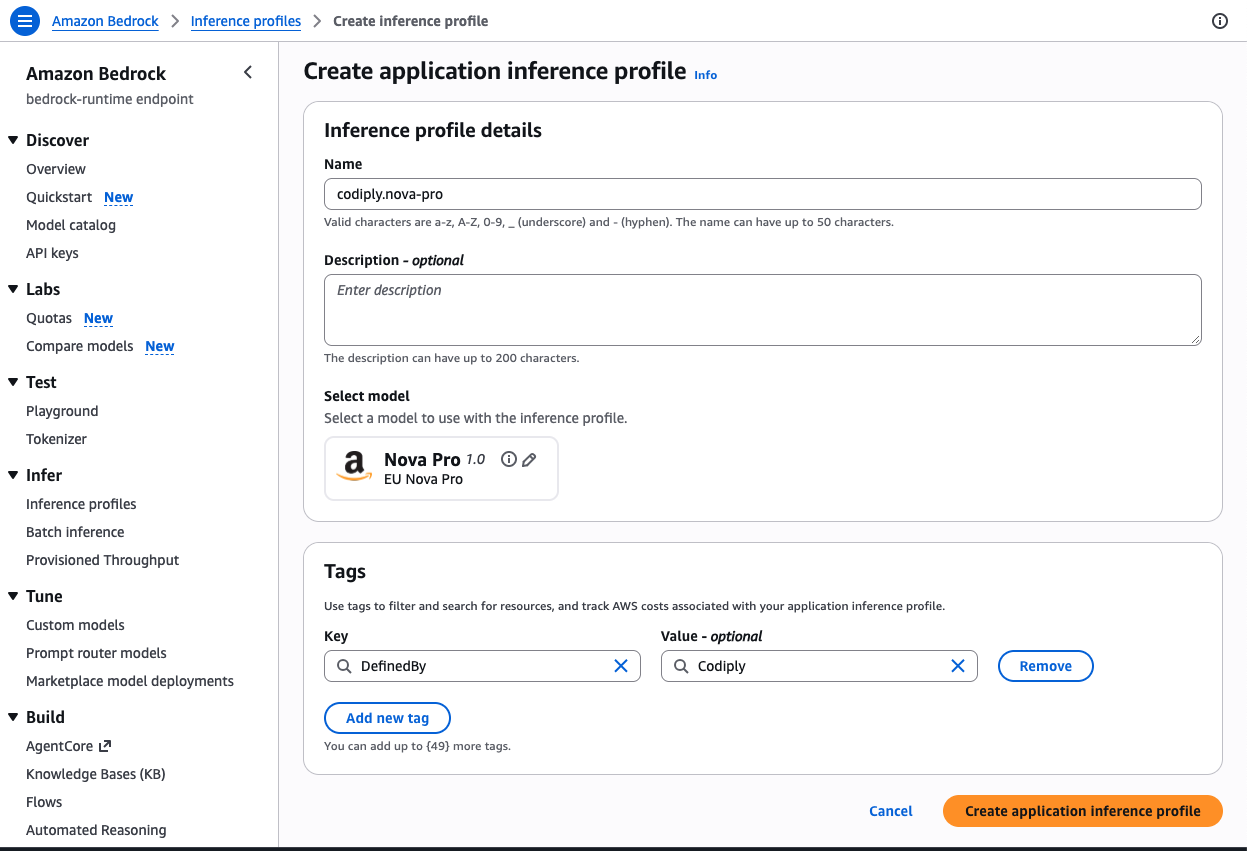
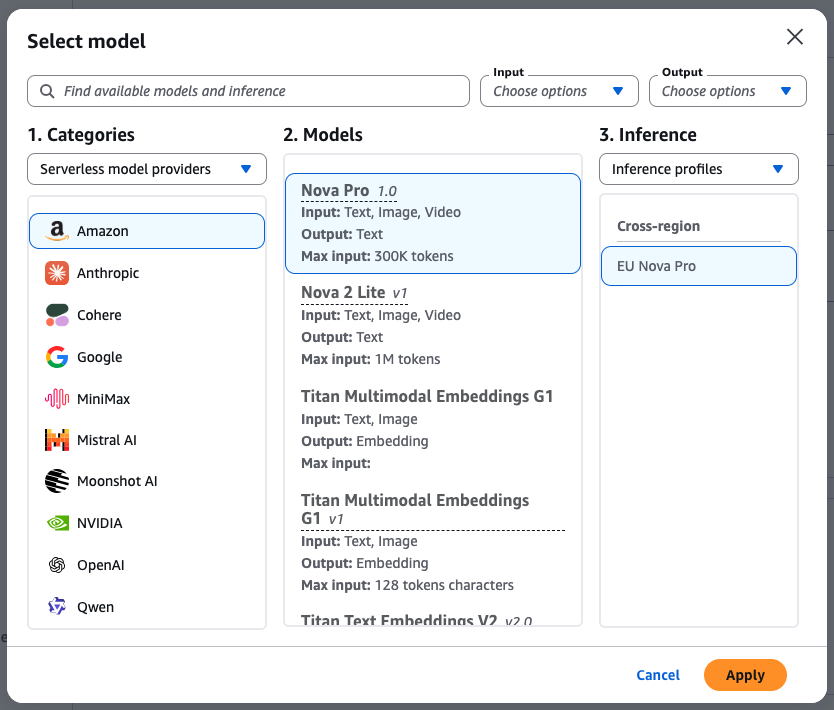
As I would like to limit usage to the inference profiles I define, I add a unique tag DefinedBy: Codiply.
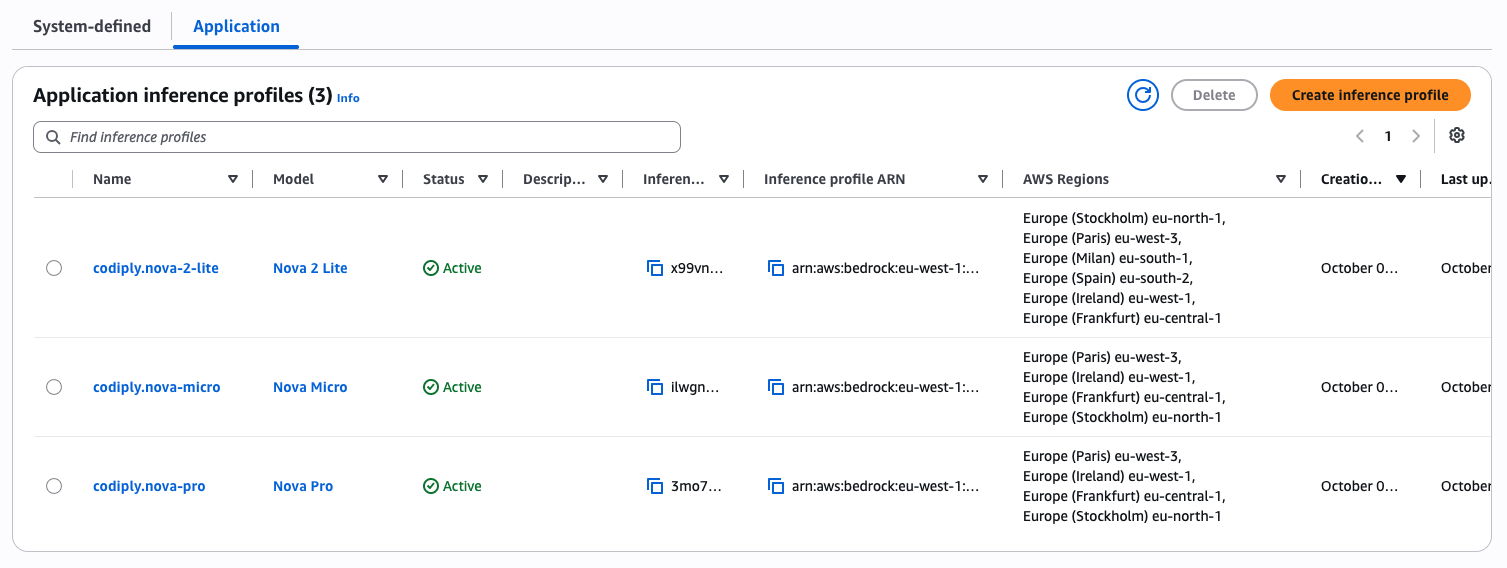
I create 3 inference profiles in total, named:
codiply.nova-2-lite
codiply.nova-micro
codiply.nova-pro
All of them use cross-region inference within the EU.
Generate a long-term Bedrock API key
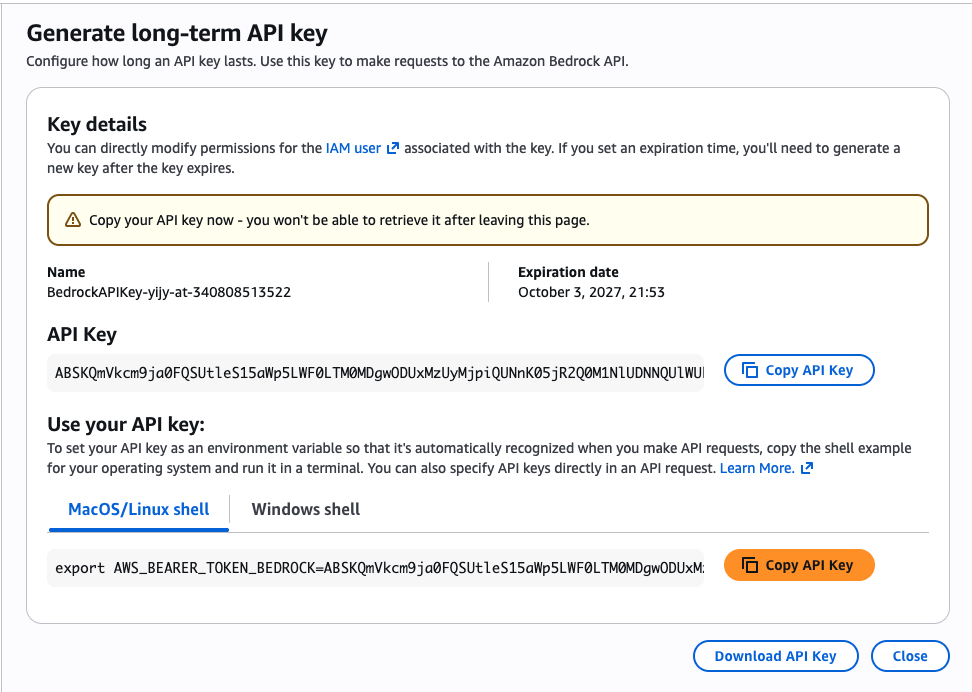
We generate a long-term API key that allows us to attach a scoped IAM policy to it.
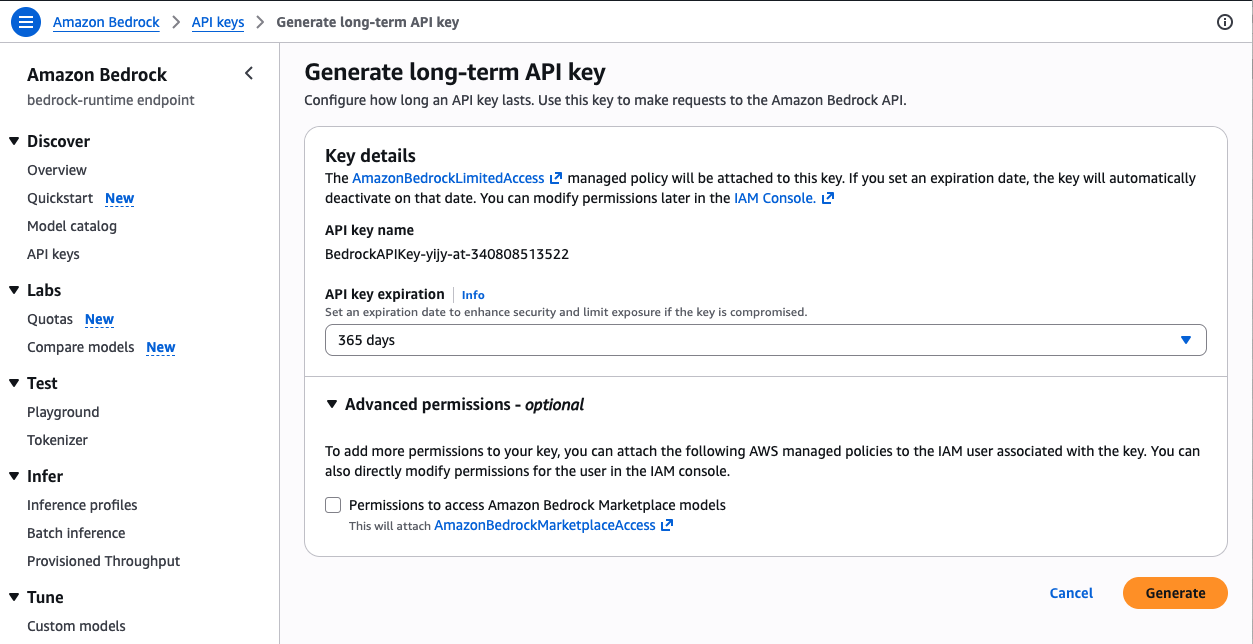
This is an example of the confirmation page for a key that I have deleted. You will need to copy the generated key, because you will not be able to retrieve it again after you move away from this page.
Scope access with an IAM policy
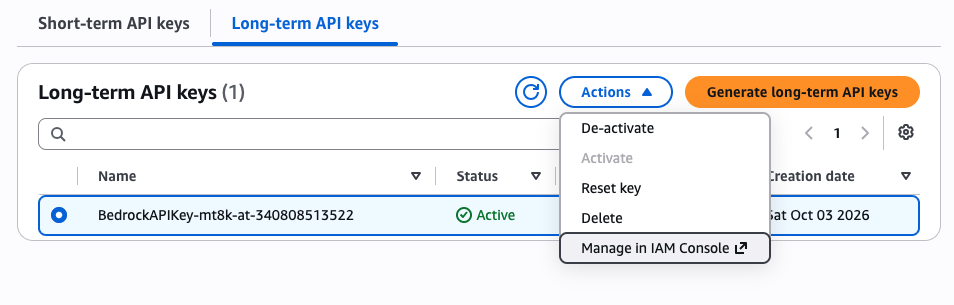
The generated API key comes with a new IAM user. You can jump to the IAM user like this:
and then open its permissions tab:
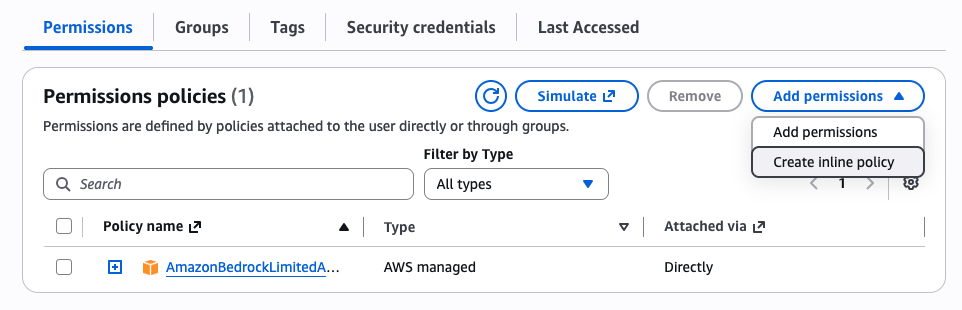
Here we are going to do 2 modifications.
First, remove the AmazonBedrockLimitedAccess managed policy, which grants very wide permissions across Bedrock. We want our key to be able to call only our 3 tagged inference profiles, not other AWS profiles.
Second, add the following policy. Defining it inline is the easiest way. You will need to replace <ACCOUNT ID> with your account number.
{
    "Version": "2012-10-17",
    "Statement": [
        {
            "Sid": "InvokeInferenceProfiles",
            "Effect": "Allow",
            "Action": [
                "bedrock:InvokeModel",
                "bedrock:InvokeModelWithResponseStream"
            ],
            "Resource": [
                "arn:aws:bedrock:*:<ACCOUNT ID>:application-inference-profile/*"
            ],
            "Condition": {
                "StringEquals": {
                    "aws:ResourceTag/DefinedBy": "Codiply"
                }
            }
        },
        {
            "Sid": "InvokeUnderlyingModels",
            "Effect": "Allow",
            "Action": [
                "bedrock:InvokeModel",
                "bedrock:InvokeModelWithResponseStream"
            ],
            "Resource": [
                "arn:aws:bedrock:*::foundation-model/amazon.nova-2-lite-v1:0",
                "arn:aws:bedrock:*::foundation-model/amazon.nova-pro-v1:0",
                "arn:aws:bedrock:*::foundation-model/amazon.nova-micro-v1:0"
            ]
        },
        {
            "Sid": "CallBedrockWithBearerToken",
            "Effect": "Allow",
            "Action": [
                "bedrock:CallWithBearerToken"
            ],
            "Resource": "*"
        }
    ]
}
The user permissions should look like this now:

The policy has 3 parts:
InvokeInferenceProfiles— allows calling only your tagged inference profiles (not other AWS profiles in your account)InvokeUnderlyingModels— allows calling the specific Nova models behind those profilesCallBedrockWithBearerToken— allows using the API key as a bearer token for authentication
Configure OpenCode to Use Amazon Bedrock
Edit your OpenCode configuration file at ~/.config/opencode/opencode.json and add the amazon-bedrock provider:
{
  "provider": {
    "amazon-bedrock": {
      "options": {
        "region": "eu-west-1"
      },
      "models": {
        "bedrock.codiply.nova-micro": {
          "id": "arn:aws:bedrock:eu-west-1:<ACCOUNT ID>:application-inference-profile/<INFERENCE PROFILE ID>",
          "limit": {
            "context": 128000,
            "output": 10000
          },
          "modalities": {
            "input": ["text"],
            "output": ["text"]
          }
        },
        "bedrock.codiply.nova-2-lite": {
          "id": "arn:aws:bedrock:eu-west-1:<ACCOUNT ID>:application-inference-profile/<INFERENCE PROFILE ID>",
          "limit": {
            "context": 300000,
            "output": 10000
          },
          "modalities": {
            "input": ["text", "image"],
            "output": ["text"]
          }
        },
        "bedrock.codiply.nova-pro": {
          "id": "arn:aws:bedrock:eu-west-1:<ACCOUNT ID>:application-inference-profile/<INFERENCE PROFILE ID>",
          "limit": {
            "context": 300000,
            "output": 10000
          },
          "modalities": {
            "input": ["text", "image"],
            "output": ["text"]
          }
        }
      }
    }
  }
}
Two things to note:
- The profile ID is a random string you find in the console — it is not the profile name you chose. You can copy the complete ARN of the inference profile directly from the console.
- I included a custom marker string (
codiplyin my case) in the model names because it makes them easy to find in OpenCode's model picker. Use any marker you like.
Launch OpenCode and run the /connect command. Select Amazon Bedrock and paste your API key. It will be stored in ~/.local/share/opencode/auth.json:
{
  "amazon-bedrock": {
    "type": "api",
    "key": "<API KEY>"
  }
}
Select Your Model in OpenCode
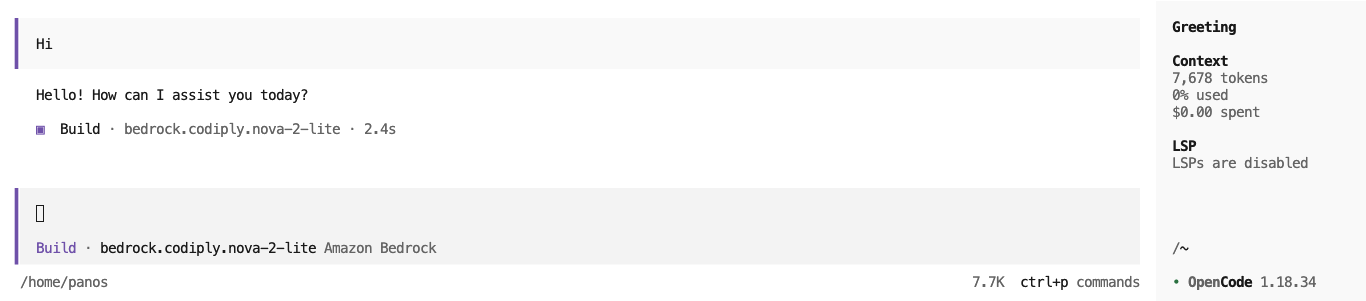
In OpenCode, type /model and search for the model name you defined in opencode.json.
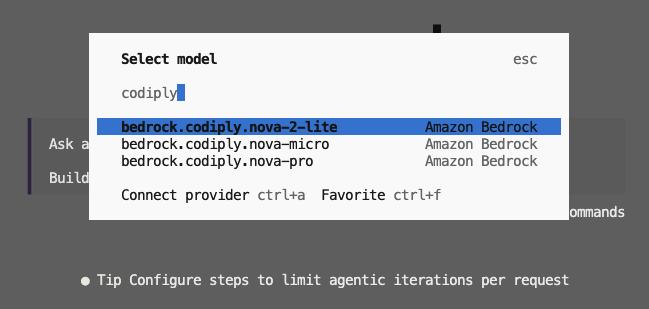
You are now ready to use the model and have a conversation in OpenCode!
Monitor Your Bedrock Usage
In the console, click an inference profile and open its metrics. This lets you monitor your usage and track your spend per profile.

Deactivate Your API Key When Idle
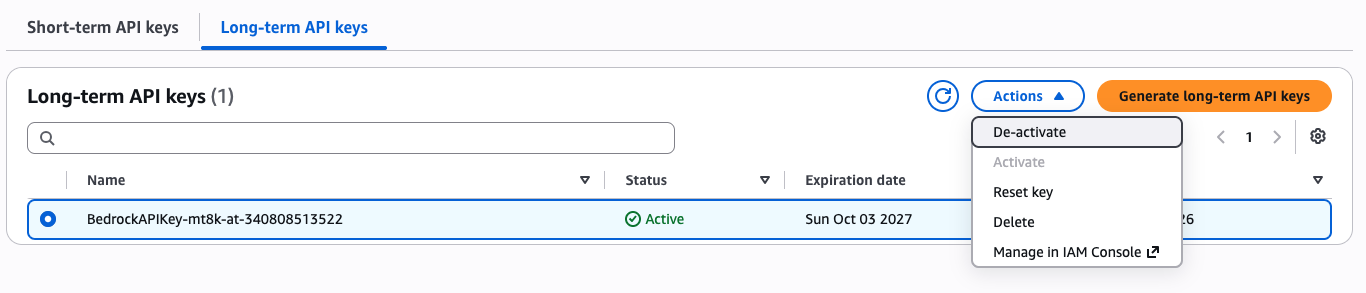
For peace of mind when not coding for longer periods, you can temporarily disable the key from the AWS Bedrock console. This prevents unauthorized use while still letting you re-enable the key without redoing the entire setup.
Troubleshooting
"The maximum tokens you requested exceeds the model limit"
If you see this error:
undefined: The maximum tokens you requested exceeds the model limit of 10000. Try again with a maximum tokens value that is lower than 10000.
make sure the model is configured with the correct output limit in ~/.config/opencode/opencode.json:
"limit": {
  "context": 300000,
  "output": 10000
}
Summary
This guide showed you how to securely connect OpenCode to a restricted set of Amazon Bedrock models using application inference profiles. You now have:
- A secure setup that limits model access to only your tagged inference profiles
- Properly scoped API permissions through a custom IAM policy
- OpenCode configured to work with your restricted Nova models
- Full visibility into usage and spend via CloudWatch metrics
- The ability to deactivate your API key when not in use
All while keeping your data processing within a single geographic area for compliance and latency benefits.
Comments
Join the discussionNo comments yet. Be the first to comment.